
Introduction
Yo yo yo, I'm Mohit! This blog is about my RAG journey, how I started understanding RAG, its core components, and how I'm building my first end-to-end RAG (Retrieval-Augmented Generation) application from scratch using Python, without relying on any RAG framework.
I've seen most RAG applications being built as web apps, so I decided to build something for the terminal instead.
Meet Convo, a local-first terminal user interface (TUI) application that lets you select a file from your current directory and start chatting with it. But before jumping into the implementation, I wanted to understand how RAG actually works under the hood, what components we need, and why we need them. That's what this first part is about.
What is RAG? Why is it needed?
RAG (Retrieval-Augmented Generation) is a technique that improves an AI model's answers by retrieving relevant information from external sources and supplying that information to the model as context. Rather than depending entirely on what an LLM learned during training, RAG allows it to use information from documents, databases, previous conversations, or other knowledge sources.
But why do we actually need it? Let's say you have a 100-page PDF and want to ask an LLM some questions about it. The LLM doesn't automatically know what's inside your PDF, and sending the entire document with every question isn't always practical because of context window limitations, token costs, and a lot of unnecessary information. That's where RAG comes in. Instead of sending the entire document, we can retrieve only the relevant parts of it and pass them to the LLM as context.
One important thing to understand is that RAG doesn't retrain the LLM or update its knowledge permanently. We're simply giving it additional information at the time of generating an answer.
A RAG system has two fundamental components:
- Retriever: Finds relevant information from an external knowledge source.
- Generator: Uses the retrieved information along with the user's question to generate a response.
Architecture of RAG
There are two main workflows in a RAG architecture.
1. Indexing
This is where we prepare our documents so they can be searched later.
Document Loading → Parsing → Chunking → Embedding → Vector Database
- Document Loading: Reading documents from sources like PDFs, text files, websites, etc.
- Parsing: Extracting and cleaning useful text from those documents.
- Chunking: Splitting large documents into smaller, manageable pieces.
- Embedding: Converting those chunks into numerical vectors using an embedding model.
- Vector Database: Storing the embeddings along with their text and metadata so we can search them later.
2. Querying
This happens when the user asks a question.
User Query → Query Embedding → Retriever → Context + Prompt → LLM → Answer
When a user asks something, we convert the question into an embedding using the same compatible embedding model that we used during indexing. The retriever then searches the vector database for chunks that are semantically similar to the user's question. We take those retrieved chunks, combine them with the question and instructions, and send everything to the LLM. The LLM generates an answer using that context.
Core Components of a RAG Application
| Component | Purpose |
|---|---|
| Data Source | Supplies knowledge (PDFs, websites, documents, etc.) |
| Document Loader / Parser | Loads documents and extracts usable content |
| Text Chunker | Splits large documents into smaller chunks |
| Embedding Model | Converts text into numerical vectors |
| Vector Database / Index | Stores embeddings and enables similarity search |
| Retriever | Finds relevant document chunks for a query |
| Prompt / Context Builder | Combines retrieved context, user query, and instructions |
| Generative LLM | Generates answers using the retrieved context |
Working
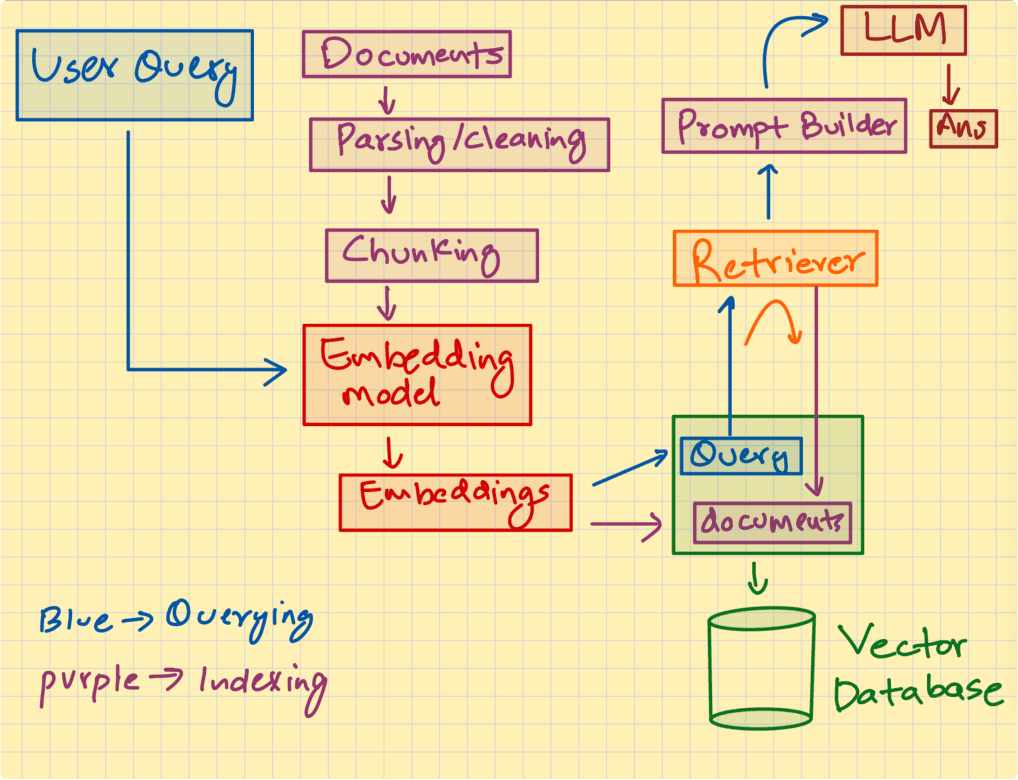
The important thing to notice in this workflow is that indexing and querying are two different processes. We don't need to load, parse, chunk, and embed the entire document every time a user asks a question, assuming the document has already been indexed and hasn't changed. We just embed the user's query, search for relevant chunks, and pass them to the LLM. Of course, this is just the basic RAG architecture. There are many other techniques like hybrid search, query rewriting, reranking, and so on, but we'll get into those later.
Some other components which are used in a RAG application but not in the core pipeline.
These components are not the part of core RAG pipeline , but used for making ab Full stack user friendly RAG application.
| Component | Purpose |
|---|---|
| Session Management | Creates, tracks, resumes, and manages user conversations |
| Chat History (Temporary / Persistent) | Stores previous messages within a session, in memory or a database |
| Context Management | Selects and manages relevant conversation history, retrieved documents, and token budgets |
| Tool Calling | Allows the LLM to interact with external tools, APIs, and services |
| Memory | Stores and retrieves useful information across conversations |
| Caching | Reuses previously computed results to reduce latency and computational costs |
| Document Management | Handles document uploads, indexing, updates, deletion, and metadata |
For your initial RAG implementation, prioritize session management, chat history, context management, and document management. Add memory, caching, and tool calling as your application becomes more advanced.
Why say no to frameworks (especially if you are a beginner)
When I started learning RAG, I saw a lot of videos on YouTube saying "Build your first RAG app using LangChain", "RAG with LangGraph", "Use Mastra", "Use Vercel AI SDK", etc. But hardly any of these videos explain how a RAG application actually works under the hood, what components are involved, why we need them, and how to build them from scratch.
I'm not saying using frameworks is bad. Frameworks are just abstractions over code that someone has already written for you. They make development faster, but if you don't understand what's happening underneath, you're just connecting a bunch of prebuilt components without knowing how they work. As a beginner, I think you should first understand how document loading, chunking, embeddings, vector databases, retrieval, and context construction actually work. Try building a simple RAG pipeline yourself using Python and the necessary libraries.
Once you understand the fundamentals, frameworks will make much more sense. You'll know what they're abstracting away, when to use them, and when you don't need them. The goal shouldn't be to learn how to use a RAG framework. It should be to understand how to build a RAG system. Additionally, I personally prefer building things framework-free or with as few frameworks as possible. As I mentioned in one of my previous posts, I really love the core philosophy behind Pi and OpenCode. They're great examples of agentic software built without relying heavily on agent frameworks, which gives their engineers more control over how things work under the hood, instead of being limited by framework abstractions.
Conclusion
So that's pretty much it for Part 1. We went through what RAG actually is, why we need it, how the indexing and querying pipelines work, and the core components required to build a RAG application. One thing I've realized while learning RAG is that the basic idea isn't that complicated.The interesting part is how you build these components, connect them together, and make the whole system actually work well.
In Part 2, we're getting more into the technical implementation, tech stack, and some advanced concepts of RAG.
Check out: convo.bemohit.dev
See you in Part 2!